How to Pay NBI Clearance Using GCash? Best Guide 2026
Greetings, prospective candidates! Understand how to pay NBI Clearance using GCash most quickly.
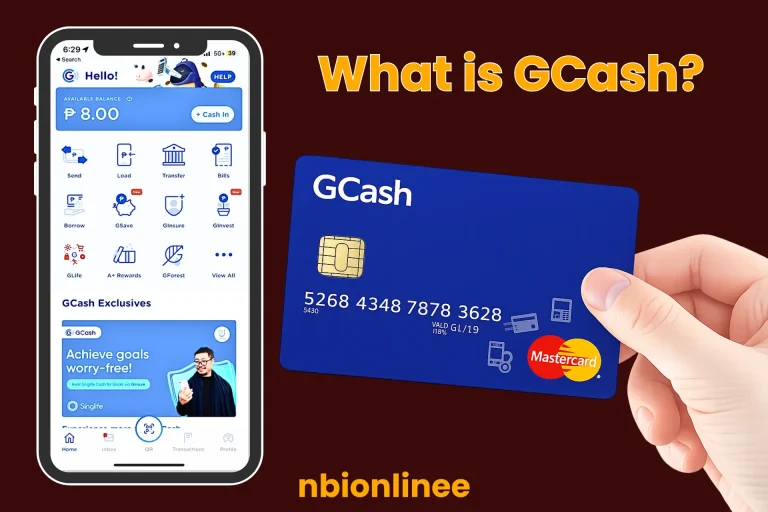
What is GCash?
GCash is a mobile wallet or super app that lets you do all your payments through your smartphone. With GCash, you can instantly transfer funds to anyone, pay bills at over 400 billers, shop online, buy load, save, and borrow! GCash makes managing your money & cashless payments easier and faster than ever before.
Key Requirements Before Payment (Prerequisites)
Important Reminders
No Walk-ins: To make a payment or receive your clearance, you must first book an appointment online.
Payment Window: If you do not attend your appointment and have not made a payment, your appointment may be automatically cancelled by the system.
New Job Seekers: Under Republic Act No. 11261, new job seekers may obtain a clearance at no charge. To receive your free clearance, you are required to present a Barangay certificate and register with the dedicated First-Time Job Seekers Portal.
How to Pay NBI Clearance Using GCash?
After getting the reference number from the NBI site, follow the steps below in the GCash app; once you have your reference number from the NBI website, you can continue with these actions using the GCash app:
Step 1:
First, proceed to your GCash app account. Before signing in to your GCash app account, make sure you have enough balance (normally between PHP 130 and 155).
Step 2:
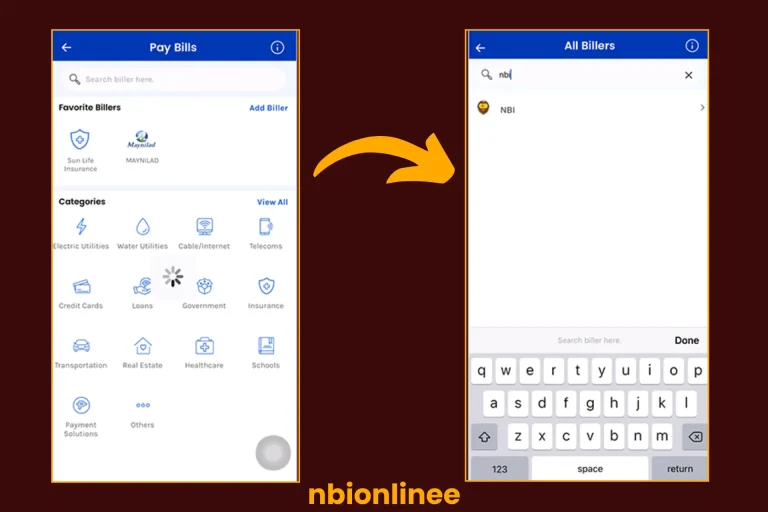
Select the Bills button seen on your GCash dashboard.
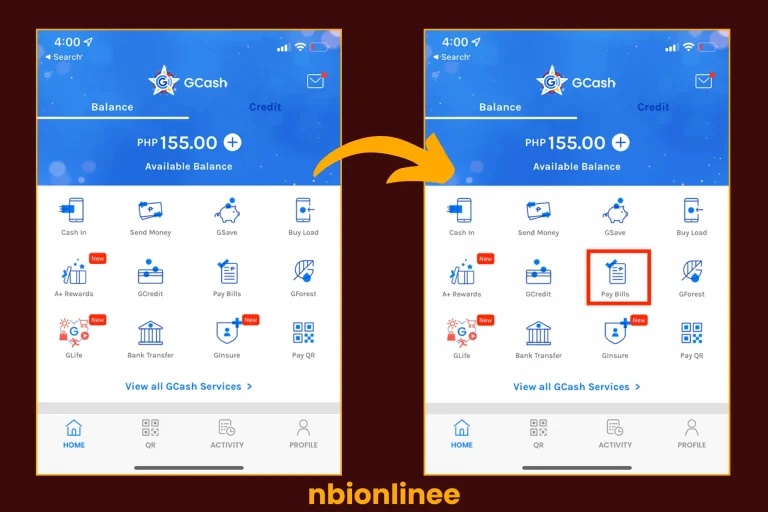
Step 3:
Choose the Government’s preferred payment option for your bill.
Step 4:
Look up the NBI among the list of government departments listed under the “Government” heading.
Step 5:
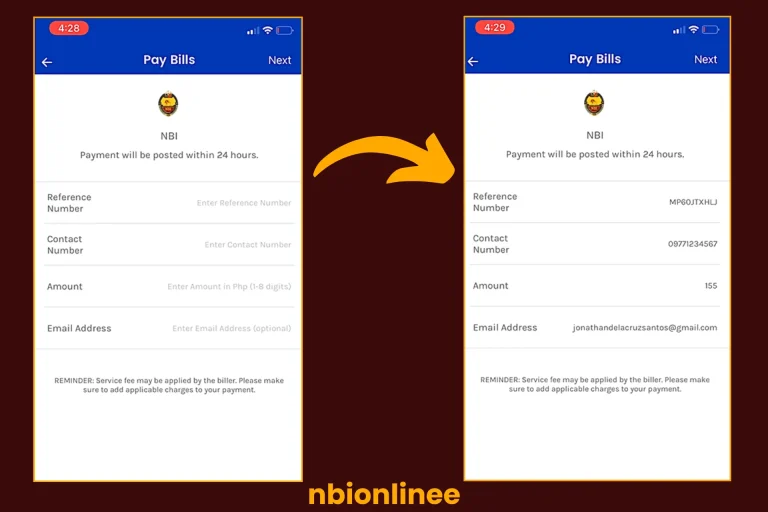
Include the following specifics:
- Reference Number Given to You From the NBI Portal,
- Amount to be Paid (typically ₱130 + Service Fees), and
- Your contact phone number (which was used during registration).
Step 6:
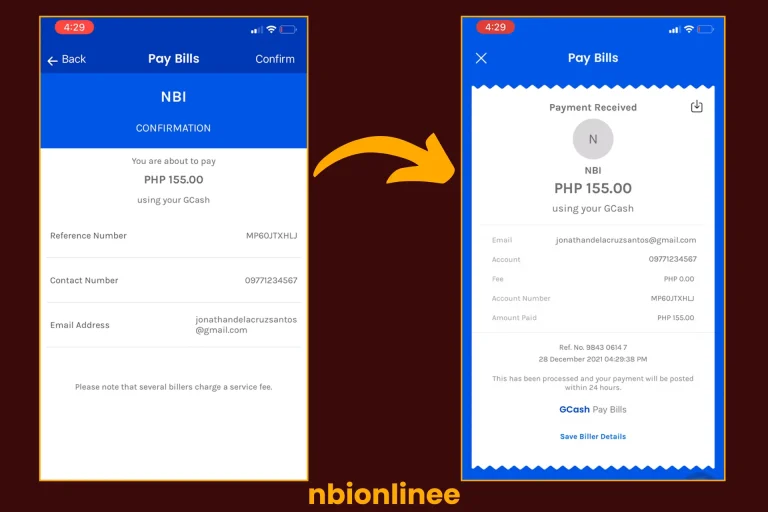
Check your entered data, then select Next and Confirm, and finally take a screenshot of your digital receipt for your appointment.
Next Steps After NBI GCash payment
Once you pay for your NBI GCash payment, the next step will depend on whether you are applying for a brand-new NBI Clearance or renewing an existing one through the online renewal option (no-show renewal).
Scenario 1: New Application or Standard Renewal (in person)
To validate your payment with a reference number, you must first create an NBI online account. Follow this easy guide.
Scenario 2: Online Renewal (door-to-door delivery)
You have to set up an NBI online account before you can apply for an internet renewal with door-to-door delivery. This should allow you to check the appointment date when you can make your appointment.
Scenario 3: You Missed Your Original Appointment
In most cases, if you pay but then do not show up for your appointment, you have a grace period of 15 days from the date of your original appointment to use that payment at the branch of your choice.
Comparison of NBI Clearance Payment Methods
Each method for paying the NBI clearance fee offers the same options; however, the key differences are convenience and the way the payment is processed.
| Feature | GCash | 7-Eleven | Bayad Center | ECPay Partners | Online Banking |
| Method | Mobile App | CLiQQ Kiosk or App | Over-the-counter or App | Over-the-counter | Bank Website or App |
| Process | Entirely digital via “Bills” | Get slip from Kiosk; pay at cashier | Present Ref # to cashier | Present Ref # to cashier | Log in and pay via Ref # |
| Base Fee | ₱130 | ₱130 | ₱130 | ₱130 | ₱130 |
| Service Fee | ₱25 – ₱30 | Approx. ₱20 – ₱25 | Approx. ₱25 | Approx. ₱25 | Varies by bank |
| Location | Anywhere with internet | Local 7-Eleven store | Physical outlets | M Lhuillier, RD Pawnshop, etc. | Anywhere with internet |
| Feature | GCash | 7-Eleven | Bayad Center | ECPay Partners | Online Banking |
| Method | Mobile App | CLiQQ Kiosk or App | Over-the-counter or App | Over-the-counter | Bank Website or App |
| Process | Entirely digital via “Bills” | Get slip from Kiosk; pay at cashier | Present Ref # to cashier | Present Ref # to cashier | Log in and pay via Ref # |
| Base Fee | ₱130 | ₱130 | ₱130 | ₱130 | ₱130 |
| Service Fee | ₱25 – ₱30 | Approx. ₱20 – ₱25 | Approx. ₱25 | Approx. ₱25 | Varies by bank |
| Location | Anywhere with internet | Local 7-Eleven store | Physical outlets | M Lhuillier, RD Pawnshop, etc. | Anywhere with internet |
Conclusion
GCash is one of the fastest and easiest ways to pay your NBI clearance fees today. GCash lets you complete your payment (without going to the bank or a payment centre) anytime. Verify your payment by entering the correct reference number, confirming your information, and saving your payment receipt. Remember always to verify the payment status on the NBI portal to ensure it has been completed (showing as “Paid”).
We are sure that you’ve got complete understanding about how to pay NBI Clearance using GCash.